A protein–ligand complex, end to end
Tested against md-tools 0.6.1. The structures, figures and numbers are from the prepared
TYK2 fixture and its build records. The parameterisation and complex-build commands below are the
recorded preparation of that fixture, with its ligand_catalog path adapted for a standalone
working directory; they have not been re-executed for this page.
These pages all use one system, prepared once. Preparing a protein separately for each method is how four methods end up studying four slightly different proteins.
The system: TYK2 with ejm_31
TYK2 is a non-receptor tyrosine kinase of the JAK family, and the structure here is its kinase domain — the two-lobed fold every protein kinase shares, with the ligand bound in the cleft between the lobes where ATP normally sits.
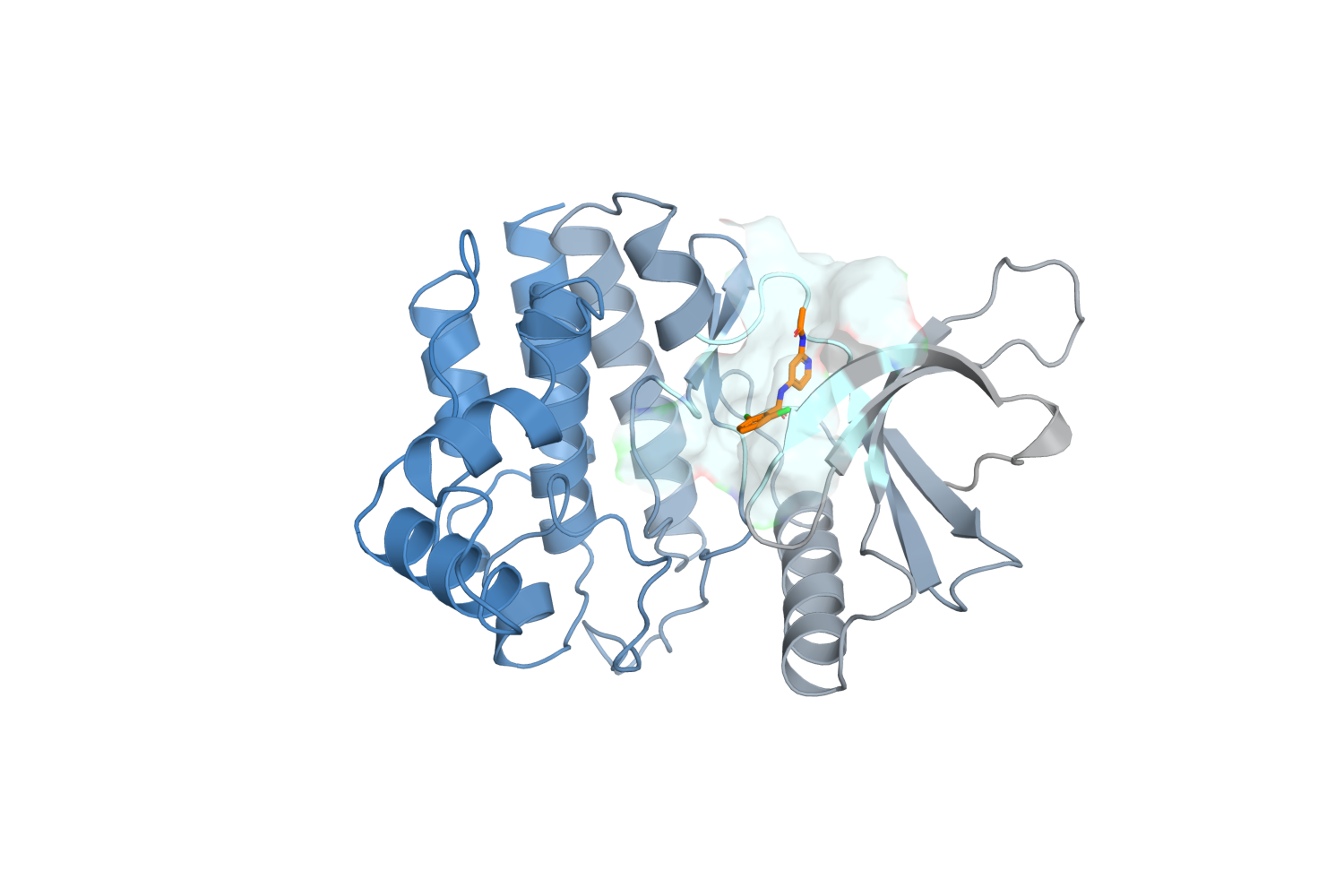
The prepared complex: 4,670 protein atoms in one chain, the ligand in orange, and the residues within 5 Å of it shown as a translucent surface. Rendered from prepared/complex_ejm_31.pdb.
ejm_31 is a small neutral inhibitor — 32 atoms, an amide linking a dichlorophenyl ring to a
pyridine — from a congeneric series of sixteen with measured affinities. Its experimental binding
free energy is −9.54 kcal/mol.
Zoomed into the site, the reason it binds where it does is visible: the ligand makes the two hinge hydrogen bonds that almost every ATP-competitive kinase inhibitor makes, to the backbone of the residues joining the two lobes.
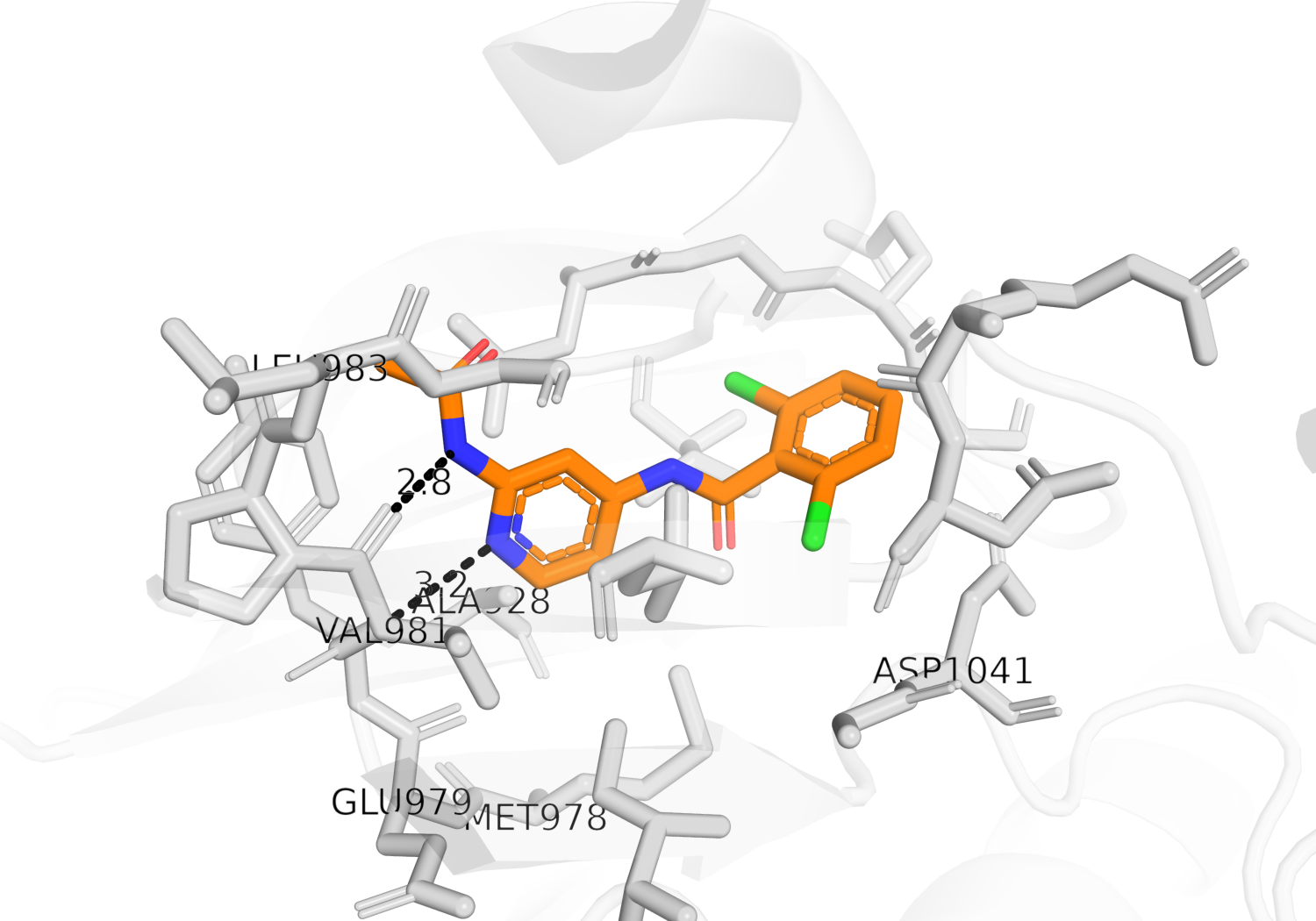
The ligand (orange) against the residues within 4.5 Å (grey), hydrogens hidden. The dashed lines are the two hinge hydrogen bonds, 2.8 Å and 3.2 Å in the prepared structure. Distances are measured from the coordinates, not drawn by hand.
That pocket is why this system is used to demonstrate selective REST2: the interesting degrees of freedom — the ligand's own torsions, and the sidechains lining the site — are a few hundred atoms out of 53,030, and heating only those is the whole point of choosing a hot region.
Where the inputs come from
The protein and the ligands are from
OpenFreeEnergy/openfe-benchmarks,
openfe_benchmarks/data/benchmark_systems/jacs_set/tyk2/ — MIT licensed, Copyright (c) 2022
Irfan Alibay. Four files matter:
protein.pdb                      the kinase domain, ACE/NME capped
ligands.sdf                      sixteen congeneric ligands with bond orders
experimental_binding_data.json   the measured affinities
PREPARATION_DETAILS.md           what upstream did to the structure, and why
git clone https://github.com/OpenFreeEnergy/openfe-benchmarks
cd openfe-benchmarks/openfe_benchmarks/data/benchmark_systems/jacs_set/tyk2
Extract the one ligand you want from the multi-molecule SDF — the bond orders in that file are what parameterisation needs, and a PDB cannot supply them:
from rdkit import Chem

supplier = Chem.SDMolSupplier("ligands.sdf", removeHs=False)
ejm_31 = next(m for m in supplier if m.GetProp("_Name") == "ejm_31")
Chem.MolToMolFile(ejm_31, "ejm_31.sdf")
1. Build the ligand parameters, once
A ligand needs its own parameters before it can appear in any simulation, and MD-tools makes that a separate step with its own output: a parameter package, created once and reused in every environment — complex, solvent box, vacuum — so that every leg of every later calculation uses the identical intramolecular Hamiltonian.
mkdir -p tyk2 && cd tyk2
md-openmm build-top --parameterize -i ../ejm_31.sdf --config para.config \
    -op packages/L31.pdb -os packages/L31.xml \
    -log packages/parameterize.log --resname L31
It writes a package directory — that directory is the thing later builds point at:
tyk2/
└── packages/
    └── LOCAL-DKNAYSZNMZIMIZ/
        └── param_bd1388e5fe3e/
            ├── molecule.sdf       the exact chemical state
            ├── parameters.ffxml   the parameters themselves
            ├── metadata.json      identities, charges, provenance
            └── parameter.config   what a build must match to REUSE it
The two names are derived, not chosen: LOCAL-… is the compound id from the molecule's InChIKey,
and param_… is a digest of the parameters. Yours will match these if the chemistry and the
settings match.
para.config states the small-molecule force field and the charge method:
# para.config
solute:
  kind: ligand
  ligand_forcefield: openff-2.2.1        # SMIRNOFF; the default is sage-2.2.1
  ligand_charge_method: am1bcc           # through AmberTools sqm
  aliases: [ejm_31]                      # searchable names — set them now, see below
The package records the force field, the charge method and the implementation that produced the
charges (backend_id: ambertools-sqm), so a later build can tell whether a package it found was
made the same way it would make one.
AM1-BCC through AmberTools sqm takes about 70 seconds for a ligand this size. The package that
comes out is identified by its chemical state and its parameters, not by its conformer — the
same molecule from a different pose produces the same package id.
Give the package aliases before you register it
solute.aliases defaults to empty and registration is write-once. A package registered
without aliases can only ever be found by its compound id, never by the name you think of it
by, and that cannot be corrected afterwards. See ligand packages.
2. Build the complex
With the package in hand, the complex build reuses it rather than re-parameterising:
# complex.config -- written in tyk2/, beside packages/
solute:
  kind: complex
ligands:
  - select: {chain: B, resid: "1"}
    parameters: LOCAL-DKNAYSZNMZIMIZ/param_bd1388e5fe3e   # <compound-id>/<parameter-id>
ligand_catalog:
  path: ./packages        # the directory step 1 wrote into, relative to THIS file
forcefield:
  protein: ff14SB
solvent:
  model: TIP3P
  padding_nm: 1.2
  box_shape: cube
  cutoff_nm: 0.9
constraints:
  type: HBonds
  rigid_water: true
md-openmm build-top -i ../complex_ejm_31.pdb --config complex.config \
    -os build/built.xml -op build/built.pdb -log build/built.log
The two lines work together. ligand_catalog.path says which directory to look in — here the
one step 1 wrote, relative to complex.config itself — and parameters names the package inside
it as <compound-id>/<parameter-id>, the two directory levels in the tree above. If the package is
already in the machine catalog under $MD_DATA, drop ligand_catalog and keep the parameters
line; if you would rather not name the id at all, write parameters: search and let the build find
a package whose recorded criteria match.
built.log says which route ran — reused (stated reference), reused (catalog search) or
created — so no build can quietly regenerate charges without saying so.
Built this way the system is 53,030 particles, 16,462 residues, ff14SB and TIP3P in a 1.2 nm cubic box. Everything downstream — plain MD, selective REST2, and later the alchemical methods — starts from exactly these files.
Why ff14SB and TIP3P rather than ff19SB and OPC
OPC applies its own rounded 1-4 electrostatic scale to every pair, the ligand's included, while a vacuum build applies the package's exact value. Alchemical cycles pair a solvated leg with a vacuum leg and refuse that mismatch, so the choice is made here, once, for every method that will use this system.
Where to go next
| method | what it is for | |
|---|---|---|
| Selective REST2 | choosing the hot region: the ligand alone, or the ligand plus the sidechains lining the pocket | published, 0.6.1 |
| cMD | a long unbiased simulation of the same complex, as the reference every enhanced method is compared against | published, 0.6.1 — 1 µs |
| AIS | annealing a weakened pocket back to full strength | published, 0.6.1 — usable for the ligand alone, not for the ligand plus its shell |
| Umbrella sampling | a potential of mean force along the ligand–protein centre-of-mass distance | page planned, 0.6.5 |
| Alchemical — ligand to ligand | absolute and relative binding free energies on this complex | planned, 0.6.5 |
Umbrella sampling arrives in 0.6.3 and the alchemical pages in 0.7.0. They are listed here so the shape of the set is visible; neither is written yet, and neither is linked to a page that does not exist.
Every page here copies its numbers from the files a real run produced, which is why the cMD page appeared only once its 1 µs run had finished — 4 days 6 h on one card.